
Jaguar: Jugs
The Jaguar Unmodified Game Server, designed by Doug Engel a.k.a. Thunderbird, was recently released by ScatoLOGIC. This server extends the functionality of the Jaguar by allowing you to upload “underground” game files, demos, or game patches to the Jaguar console and making possible Battle Sphere screen shots.

JUGS works as follows:
(1) put BattleSphere into the Jaguar and enable the JUGS receiver software already embedded in the game using an access code
(2) plug the Jaglink into the back of the Jaguar
(3) plug one end of the Jaglink cord into the Jaglink and the other end into the JUGS p.c. serial port pass through
(4) and then plug the JUGS serial port pass through into the serial port of your computer. You than can upload Jaguar “.bin” files from your p.c. using the JUGS loader Software. Once uploaded you can even shut down your computer and the game remains on your Jaguar console until you power it off.
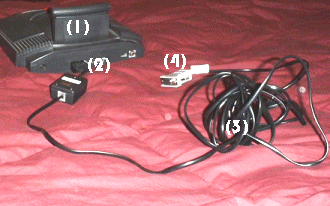
From left to right (1) Jaguar with Battle Sphere (2) Jaglink plugged into back of the Jaguar (3) Jaglink cable (4) p.c. serial port pass through.
The Jugs version 1 CD comes with the following software:
(1) Bonus software including the making of Battle Sphere, Battle Sphere color manual, and Battle Sphere posters in Adobe Acrobat format (.pdf)
(2) Battle Sphere Demos including an early demo, Introduction, and a music file which plays Axel F among other songs with Battle Sphere sound effects
(3) various freeware games that the original authors allowed to be included with JUGS such as Arkanna demo, Asteroids, Jag Marble, Native, Painter, and a Team Tap tester
(4) the game instruction/description files for the freeware games
(5) the ms-dos loader software to upload files to the Jaguar
(6) a Battle Sphere Patch that allows you to get past the level 92 bug
(7) and a utility that converts .abs files to .bin files.
For more information and to purchase JUGS for $29.95 plus shipping and handling go to www.buyjugs.com
Game Play & Use: JUGS has the potential to add much life and excitement to the Jaguar. It not only allows your to play additional games or demos but should spur developers to create more games. Once a potential developer creates a game they can easily test it on the Jaguar using JUGS and could eventually publish and distribute the game to other JUGS owners through download, email, or by burning it on a cd.
On the downside, in order to use JUGS you must have Battle Sphere. Due to high demand and rising component costs not all those who want Battle Sphere have been able to get it. Although more copies are currently for sale and in my opinion ScatoLOGIC will go to great lengths to see that anyone who wants Battle Sphere will get it.
JUGS is simply a wonderful extension of your Jaguar. Once you have set it up, it is easy to use and works perfectly nearly every time. Now, some of the larger games will take a while to upload to the Jaguar, but once uploaded you can play the game as many times as you desire so long as you do not turn your Jaguar off.
I really enjoyed playing games such as Tetris and Painter for the Jaguar, seeing the demos from Badcoder, and getting a look at Native (even though there is no sound). I have also uploaded successfully Jagmarble, the Arkanna Demo, Asteroids, Team Tap tester, and the Battle Sphere demos. As of yet I have not gotten Jagmania and Gorf to play.
It should be mentioned that JUGS only uploads files in the .bin format. You will find other files in formats such as .abs, .jag, or .cof. Currently, you can transfer .abs to .bin with the included JUGS software and .jag to .bin with a utility found on Just Claws. There is no utility to transfer .cof files as of yet but this may change in the future. Also, game files in a .rom format can not be run because the Jaguar does not have enough ram memory.1
In the final analysis you must get JUGS. It opens up the possibility of getting many more games and applications for your Jaguar cheaply and easily. What else can be said?
Pros: many games, demos, and patches are available, works near perfection every time, easy to use
Cons: long uploading times, need Battle Sphere, may have some initial set up problems
Links:
buyjugs.com (Buy it here!)
Atari-Jaguar.de (find developer documents, and additional game/program files to download)
BadCoder (has demos to download)
Jagu-Dome (a fairly comprehensive list of games to download)
Jaguar Playtesting Site (sign up and be a playtester)
Just Claws (find file format converter programs)
Convert Files:
To convert a file from .abs to .bin
(1) open up your dos prompt
(2) change directory to the directory where your abs2bin file resides (where you saved the JUGS software to your hard drive – for example> cd c:\jugs\utility\abs2bin)
(3) When you are at the right directory type> abs2bin.exe filenamehere.abs (make sure that the file you want to convert is also in the same directory)
(4) presto you now have the file in the .bin format
To convert a file from .jag to .bin
(1) download the utility from Just Claws
(2) open dos prompt
(3) change the directory to where the downloaded utility file is (for example > cd c:\jugs\utility\jag2bin)
(4) When you are at the right directory type> jag2bin.exe filenamehere (make sure that the file you want to convert is also in the same directory, and do not put the .jag extension on the end)
(5) presto you now have the file in the .bin format.
Current games/demos for use with Jugs
Each game requires a certain address to run.
* – requires KickStart
For review & screen shots of underground games check out the Jaguar Development section.
| Game/Patch | Address |
| Arkanna Demo | 4000 |
| Assassin Demo | 4000 (rename to .bin) |
| Asteroids | 20000 |
| BadCoder 0-4 | 4000 |
| Battlesphere Intro, music, demo, patch, patch level 92 | 5000 |
| Colors | 5000 |
| Colors + Mouse | 5000 |
| * Gorf | 4000 |
| * Jagmania | 5000 |
| Jagmarble | 5000 |
| Jag Tetris | 2000-6000 |
| JDC Demo | 4000 |
| JDC Demo 2 (same as Demo 1 but smaller) | 4000 |
| Legion Force Jidai demo (new!) | 5000 |
| Native (large file) | 5000 |
| Painter | 10000 |
| Pong | 4000 |
| Team Tap | 5000 |
| Not Working | |
| Arkanna Demo2 (added options) | |
| Assassin Demo 1 | 4000 (rename to .bin) |
| BadCode 4c, 4cj (bug Fix) | 4000 |
| Jagfest ’98 Demo | |
| JDC Demo 3 (E-JagFest) | 4000 |
| Phase Zero | |
| Slam Racer | .cof |
| Slam Racer Intro | .cof |

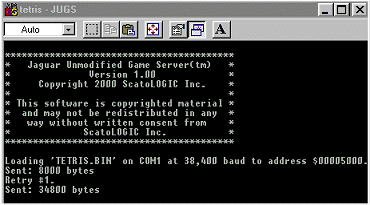
JUGS upload screen – bites being uploaded! If it displays “retry 1” several times, you may want to lower the baud rate.
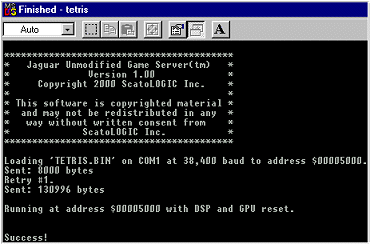
Success! The game has been uploaded to your trusty Jaguar.
| Trouble | Solution |
| Continually get retry messages (retry 1, retry 2, retry 3, retry 4, retry 5) with no bites being uploaded. | 1. There may be interference from the cable or the cable is too long. 2. Make sure that the baud from the Battle Sphere screen matches the baud that is being uploaded on your computer (edit the .bat uploading file with notepade.exe on your p.c.)3. Check your computer serial port. Try reinstalling your com 1 or com 2 drivers. My serial cable was actually connected to com 2 on my motherboard. Once I switched the cable to com 1, it worked fine.2 |
| Get a retry message but some/all the bites get transferred (it may say retry 1, transfer the bites, and retry 1 again). | 1. Although the game might work fine, you can reduce this problem by reducing the baud uploading speed. The highest working baud speed is 38,400. Try 19,200 baud. |
| Get the “success!” message indicating that the file is uploaded properly, but all you have is a black screen. | 1. Try uploading this again, from time to time this happens, especially on bigger games (Native).2. Make sure that you are uploading a .bin file. JUGS only works with .bin file format. If the file is another format such as .jag or .abs use a program converter to change it to .bin (see file descriptions above). |
| No matter what I try, I still end up getting a black screen after I load the file. | Try the KickStart program available at buyjugs.com. This utility is needed to play Gorf and Jagmania. |
Footnote 1: According to JustClaws, from DevCats, in a post on Judicial Interactive: The .ROM files are written to load to address $802000, (or rarely $800000) which is space on the cartridge. An Atari Alpine development system has 2MB or 4MB of RAM there, and a Flash-ROM cartridge has a 2MB or 4MB of Flash-ROM there, so it will work.
A standard Jaguar, however, only has the internal 2MB of RAM, and thus as code cannot be relocated from one area to another unless specially written, and because a .ROM file is normally at least 2MB there is no room even for a relocatable .ROM to load into internal RAM. Of course with JUGS, Battle Sphere is at $802000 too. JUGS, BJL, Jagserver, none load .ROMs, only Alpines! (Using BJL, $802000 might be occupied by an amateur developed RAM expansion board, or some other gadget.)
As an interesting aside, real Atari developers with Alpines were unable to dump each other’s ROMs, and look at each other’s code because to run their own code, they had to have the Alpine in the cart slot! With Jugs, you could only “examine” Battle Sphere.
(Ironically, JagServer and BJL will accept any ROM in the slot, and bypass encryption of course as no checking is carried out. Battle Sphere appears to me to be coded only to work on an unmodified Jaguar, and will not boot up on a BJL modified Atari Jaguar. Of course with BJL, no support is built-in for any two-way transfer, just uploading of files to BJL. JagServer has BIOS routines for two-way transfers. JUGS has special routines for two-way transfers.)
Footnote 2: I would check the p.c. serial port as follows: Now keep in mind, you should read your manual that came with your p.c. for specific instructions. But here is what I would do on my computer.
I would check with the Windows System “settings.” Go to start button, settings, control panel, choose “system”, choose the device manager tab and look under the “ports” heading (mine says: “ports (com & LPT)”.
(1) Make sure you see something under “ports” like communication port (mine says: “communications port (com port 1).” This should be referring to your serial port.
(2) If it is there, make sure that there is no problem with it (that there is not a red x or yellow ! next to the port).
(3) You can try changing the setting in your .bat files or manually to com2 for JUGS.
Before you move on, be sure that you have never been able to use the serial port before. If you have that would seem to indicate that the serial port is o.k. and that you have a software configuration issue (perhaps the .bat file or manual line was not entered correctly).
(4) you can reinstall the com port driver by highlighting the port and then removing it. Restart your computer and Windows will automatically see that you need to install drivers. Make sure that you have your win9X cd to reinstall the drivers.
(5) my problem actually had to do with the com port (serial) wire was connected to com 2 on the motherboard. So, I had to open up the case and reswitch the wire to com 1. Don’t do this unless you built your computer yourself or installed the com port yourself…If you bought a regular computer package than this is more than likely not your problem and you should not open your case!
Anyway there is some basic information. If the problem continues, be sure to describe what the JUGS software displays (i.e. Retry 1, Retry 2, Retry3…whatever it says).
 Addie's Atari Page